
- Select a cell or a cell range.
- On the Home tab, select Number from the drop-down.
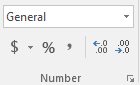
Or, you can choose one of these options:- Press CTRL + 1 and select Number.
- Right-click the cell or cell range, select Format Cells… , and select Number.
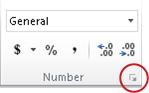
- Select the small arrow, dialog box launcher, and then select Number.
- Select the format you want.
Number formats
To see all available number formats, click the Dialog Box Launcher next to Number on the Home tab in the Number group.
Comments
0 comments
Please sign in to leave a comment.