
Save your workbook to OneDrive
Save a workbook to OneDrive to access it from different devices and share and collaborate with others.
- Select File > Save As.
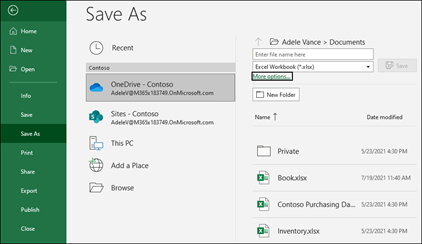
For work or school, select
OneDrive - <Company name>.
For personal files, select
OneDrive - Personal.
- Enter a file name and select Save.
You may need to sign in to your account. For more information, see Collaborate on Excel workbooks at the same time with co-authoring.
Comments
0 comments
Please sign in to leave a comment.